- All Posts
- /
- How to Send Messages Based on User Behavior
How to Send Messages Based on User Behavior
Messaging and Automation-
 Chris Hexton
-
Updated:Posted:
On this page
Most messaging fails for a simple reason: it ignores what users actually do. Batch campaigns treat everyone the same, regardless of where they are in the product. The result is low engagement, high churn, and missed revenue.
Behavioral messaging works differently. It fires messages based on specific user actions — or inactions — in your product. The timing is the point: you reach users at the exact moment they’re most receptive.
This guide explains how to build behavioral messaging from scratch. Follow these steps and you’ll have automated workflows running on real product data — without sending another irrelevant campaign.
Why behavioral messaging outperforms batch campaigns
Generic campaigns don’t fail because the copy is bad. They fail because the message arrives at the wrong time, for the wrong user. Behavioral messaging removes that mismatch entirely.
Think about how users actually move through a product. Some sign up and activate within hours. Others stall at step two and never come back. A batch campaign treats both users identically — which means it’s useful to neither.
Behavioral triggers close that gap. When a user completes their first feature action, you send a message that builds on it. When a user goes quiet for five days, you send a re-engagement nudge. When someone hits an upgrade trigger, you reach out before they self-serve elsewhere.
Each of these moments is a window. The right message inside that window can change what happens next. Behavioral messaging is simply the discipline of not missing those windows.
The downstream results are measurable. Behavioral emails consistently generate higher open rates than batch campaigns because they’re expected and contextually relevant. They feel like product communication, not marketing. That distinction matters to users — and to your deliverability.
Step 1: Map your high-value events
Start by listing the moments in your product where the right message could change an outcome. These are your behavioral triggers.
For product-led software, high-value triggers typically fall into three categories. Activation events signal that a user has reached a meaningful milestone — first login, first feature use, first report generated. Drop-off events flag where users stall — onboarding step skipped, setup flow abandoned, session lapse after X days. Expansion events indicate a user is ready for more — team member invited, integration connected, usage limit approached.
Start by picking two or three from each category. You don’t need to trigger on everything at once. A focused set of well-crafted messages beats a sprawling map of half-built workflows every time.
For each event you pick, ask one question: what’s the single best next action for this user? That answer becomes the goal of your message — and the benchmark you’ll use to measure it later.
Step 2: Track events with the right properties
Once you know which events matter, instrument them. Most teams use a library like Segment or RudderStack to send events to their messaging platform.
How you structure the event matters as much as whether you fire
it. Each event should carry properties that make personalization
possible. For example, account_created might
include plan_type, referral_source,
and company_size. Those properties let you tailor
message content to the individual — not just the event type.
Think carefully about what data each event needs to carry. A
feature_used event might include the feature name,
the user’s current plan, and whether it was their first time
using it. A checkout_abandoned event should include
the product name, price, and cart total. The more context the
event carries, the more relevant the message you can build on
top of it.
A common mistake is firing events with empty or inconsistent
properties. If plan_type is sometimes
"starter", sometimes "Starter", and
sometimes missing entirely, your segmentation breaks. Agree on
naming conventions before you instrument and enforce them
consistently.
Start with five to ten events. Add more as your program matures and you have the data to validate what’s working.
Step 3: Define your audience segments
Not every trigger should go to every user. Before a message fires, it should pass through a segment filter.
Segment by profile attributes — plan tier, role, or industry. Layer in event history, like whether a user has or hasn’t completed a key onboarding step. Add time-based conditions, like last active more than seven days ago.
The real power of segmentation comes from combining these dimensions. A re-engagement campaign targeting users who haven’t logged in for seven days is a decent start. The same campaign filtered to users on a paid plan who completed onboarding but dropped off before using a core feature is a far stronger message — because you know exactly who you’re talking to and what they’re missing.
A useful test before you send: would this message feel personally relevant to the person receiving it? If you can imagine a user thinking "this was clearly written for someone else," tighten the segment.
Avoid the temptation to widen segments for scale. Behavioral messaging earns its value through precision. A smaller audience receiving a highly relevant message almost always outperforms a larger audience receiving a generic one.
Step 4: Build your triggered workflows
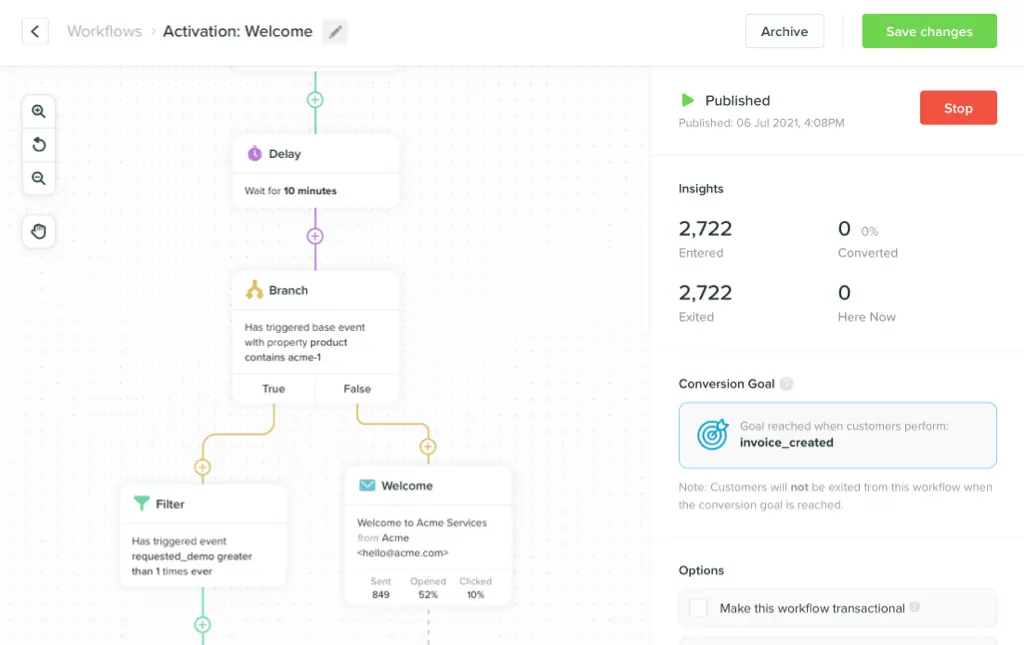
A triggered workflow has three parts: the event, the conditions, and the action. These three elements define every behavioral message you build.
Set the trigger to fire when the event occurs. Apply your segment conditions to filter the audience. Then define the action — email, push notification, in-app message, or SMS.
From there, add delays and branching logic. Delays control the timing: an onboarding nudge sent immediately may feel intrusive; the same message sent six hours later feels helpful. Branching logic routes users based on what they do next. A user who completes the action your message prompted should exit the workflow — not receive a follow-up that assumes they didn’t.
Multi-step workflows follow the same logic, just extended across time. An onboarding sequence might send a welcome email on day one, a setup prompt on day two if the user hasn’t activated, and a check-in on day five for users still stuck. Each message adapts based on what the user has or hasn’t done since the last touchpoint.
Keep your first workflows simple. A single trigger, a tight segment, one message, and a clear goal. Complexity is earned through iteration, not assumed at the start.
Step 5: Choose the right channel for each behavior
Not every behavioral moment calls for the same channel. Matching the channel to the context increases relevance and reduces friction.
Email is the default for onboarding sequences, lifecycle campaigns, and anything that benefits from length or visual formatting. It’s asynchronous — users read it when they’re ready. That makes it well-suited for educational content and anything with a clear CTA that requires thought.
Push notifications work best for time-sensitive in-product nudges. A user who added items to a cart, or a user who hasn’t opened the app in three days, is a good push candidate. Keep push messages short and direct — one idea, one tap.
In-app messages are ideal when the user is already in your product. If someone is on the feature page but hasn’t tried the feature, an in-app prompt is far more effective than an email they’ll read later. The context is already right.
SMS is the highest-interruption channel. Reserve it for genuinely time-sensitive moments — a trial expiring today, a payment that failed, an event starting now. Users tolerate SMS when the urgency is real. They unsubscribe when it isn’t.
Coordinate channels within a single workflow. There’s no rule that says a behavioral trigger has to produce exactly one message on exactly one channel. An abandoned checkout might start with an email, escalate to a push 24 hours later, and suppress both if the user converts in between.
Step 6: Write messages that match the moment
The trigger creates the context. The message has to earn it.
A user who abandoned a setup flow doesn’t need a generic "get started" email. They need help with the specific step they left. Reference their product data — the feature name, the step number, the last action they took — directly in the message body.
Subject lines matter more in behavioral messaging than in batch campaigns. A subject line like "You’re one step away from setting up your integration" outperforms "Get the most out of [Product]" every time. Specificity signals relevance before the email is even opened.
Inside the message, lead with the context that triggered it. Don’t make the user work to understand why they’re receiving this. Then state the single action you want them to take. One goal per message, one call to action. Cut everything else. If you find yourself adding a secondary CTA "just in case," that’s a sign the message is trying to do too much.
Step 7: Measure and iterate
Behavioral workflows aren’t a set-and-forget system. The first version is always a hypothesis.
Track open rates and click-throughs to measure message-level engagement. But also track the downstream behavior that actually matters — did the user complete the step, upgrade their plan, or re-engage with the product? Clicks that don’t convert are a signal the message and the landing experience aren’t aligned.
Run A/B tests methodically. Test one variable at a time: subject line, send timing, message length, or CTA copy. Let tests run long enough to reach statistical significance before drawing conclusions. The instinct to make multiple changes at once is understandable but makes it impossible to know what worked.
Set a review cadence. Look at your behavioral workflows at least once a month. Kill messages that consistently underperform. Double down on workflows that drive measurable outcomes. The best behavioral programs improve continuously because they’re built on real data from real user responses.
Common pitfalls to avoid
Too many triggers too soon. Start with your highest-value moments and expand from there. More triggers don’t produce better outcomes — focused ones do.
Missing suppression logic. If a user upgrades, stop sending upgrade prompts immediately. Build suppression conditions into every workflow before you launch it, not after a user complains.
Generic copy on behavioral triggers. A behavioral trigger attached to generic copy wastes the context it creates. Personalize every message to the specific event that fired it — or don’t send it at all.
Ignoring message frequency. A user enrolled in three active workflows can hit fatigue fast. Set a global cap — no more than two automated messages per user in any 48-hour window — as a starting baseline.
Not suppressing converted users. If a user completes the action your message was designed to drive, stop the workflow. Sending an activation nudge to a user who already activated erodes trust and signals that your platform isn’t paying attention.
Frequently asked questions
What’s the difference between behavioral and triggered messaging? They’re often used interchangeably. "Triggered" typically refers to any automated message fired by an event. "Behavioral" specifically means those events are actions taken — or not taken — by the user inside your product.
Do I need a CDP to do behavioral messaging? Not necessarily. A CDP helps centralize data across sources, but it’s not a prerequisite. Some platforms connect directly to your data warehouse and event stream — which eliminates the need for a separate CDP layer for many teams.
How many workflows should I start with? Start with three to five. Cover the highest-value moments: welcome and onboarding, core feature activation, and re-engagement after inactivity. Add more once those are working and you have data to guide priorities.
How do I avoid annoying users with too many messages? Set global frequency caps so no single user receives more than a set number of automated messages in a given period. Also build suppression conditions into each workflow so users who convert or upgrade exit the flow immediately.
At what stage does behavioral messaging make sense? Once you have a product with a defined activation moment and a measurable drop-off point, behavioral messaging is worth building. For most SaaS teams, that’s somewhere between the first 50 and 500 active users — early enough that onboarding optimization moves the needle.
Start sending behavioral messages with Vero
Disclosure: Vero is our own product. We’ve included it because we genuinely believe it belongs in this guide — but you should know we’re not a neutral party.
Vero is a multi-channel engagement platform built for product-led software teams. It connects directly to your data warehouse — Snowflake, BigQuery, Redshift, and others. That means you trigger messages on real product events without duplicating data into a separate CDP.
The visual journey builder lets product and marketing teams own workflows without waiting on engineering. Behavioral segmentation pulls from live event data and warehouse connections, so your audiences stay current without manual updates. Pricing is based on active profiles only, not total contacts — which keeps costs aligned with actual value delivered.
Start a free trial at getvero.com. No credit card required.