- All Posts
- /
- How to Trigger Emails from Product Events
How to Trigger Emails from Product Events
Messaging and Automation-
 Chris Hexton
-
Updated:Posted:
On this page
Most email marketing is built around the calendar, not the customer. Teams schedule a batch send for Tuesday, write copy based on assumptions, and hope it lands at the right time. The result is average open rates, average click rates, and a list that slowly tunes out.
Event-triggered emails are different. They fire when something specific happens in your product — a signup, a feature use, an abandoned step. The message arrives because it’s relevant, not because it’s Tuesday.
This guide covers exactly how to set that up — from identifying your trigger events to sending messages that convert.
What is a product event?
A product event is any action a user takes inside your product. Sign-ups, feature activations, file uploads, payments, cancellations — these are all events. Each one tells you something specific about where a user is in their journey.
Events are different from profile attributes like name or company. An attribute is static — it describes who someone is. An event is dynamic — it describes what they just did.
Most products generate dozens of meaningful events continuously. Your job is to identify which ones signal intent, friction, or momentum. Then respond to each one with the right message.
Why event-triggered emails outperform batch sends
The performance gap between triggered and batch emails is real. Triggered emails consistently outperform batch sends on open rates, clicks, and conversions. That’s because they arrive at the moment a user is thinking about the exact thing you’re messaging about.
Batch emails ask users to care about something on your schedule. Triggered emails respond to what users already care about. That’s the difference between interruption and relevance.
The gap compounds over time. Every triggered email gets sharper as you refine the logic, copy, and timing. Batch campaigns reset with each send.
Step 1: Identify your trigger events
Before you write a single email, map out the events that matter most in your product. These are the moments where a message can help — or where its absence causes drop-off. Start with three categories: activation, friction, and inactivity.
Activation events are the steps that move new users toward the "aha moment." A new signup is one event. Completing the first core action is another. Each milestone in your onboarding flow is worth a potential trigger.
Friction events are the steps users start but don’t finish. An abandoned checkout, a half-completed profile, a feature tried once and never again. These are your highest-ROI trigger opportunities.
Inactivity events are the absence of action. If a user hasn’t logged in for 14 days, that’s a signal worth acting on. A well-timed re-engagement email can recover users before they churn.
Most SaaS products should start with a small set of high-signal
events. Good examples include user.signed_up,
onboarding.completed,
feature.activated, and
subscription.cancelled. Start with the three events
closest to your most important business outcome.
Step 2: Connect your product data
To trigger emails from product events, your messaging platform needs to receive those events in real time. The two most common approaches are a direct API integration or a CDP like Segment or RudderStack. Both forward events from your product to the messaging tool as they happen.
If your team already uses Segment or RudderStack, the
integration is usually a one-line config change. If not,
integrate directly via API — sending a track call
each time a meaningful event occurs. Either way, the goal is the
same: the messaging platform knows what each user just did.
Some teams also pull data from a warehouse for richer segmentation. Platforms like Vero support direct SQL connections to Snowflake, BigQuery, Redshift, and PostgreSQL. This means you can use historical event data without duplicating it into the messaging tool.
Step 3: Build your trigger logic
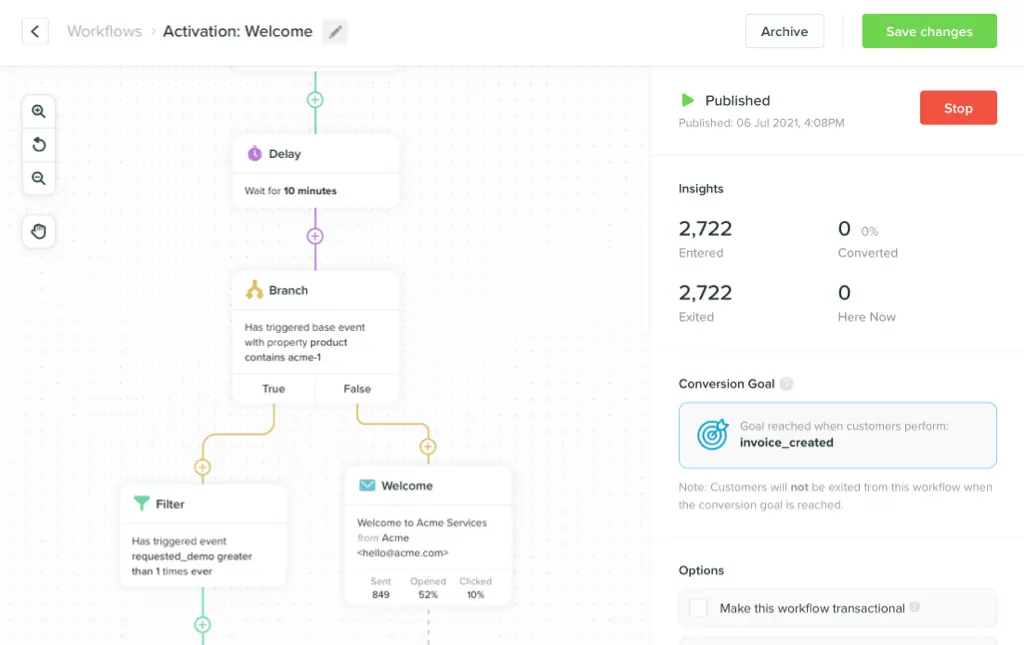
A trigger is a rule: when this event fires for this user, under these conditions, send this message. Most platforms use a combination of event triggers, filters, and delays. Here’s how to structure each.
The trigger is the event that starts the
workflow. It’s the moment of action —
signup_completed, cart_abandoned,
feature_activated. Whenever that event fires for a
user, the workflow begins.
The filter narrows which users should receive the message. A user who completes onboarding in session one needs a different email than one who abandoned it halfway. Filters target based on user properties, prior events, or segment membership.
The delay controls when the message goes out after the trigger fires. Sometimes the right message is immediate — a password reset, a welcome email. Other times you should wait — a nudge 30 minutes after an abandoned flow outperforms one sent 30 seconds later.
You can layer these three elements to build sophisticated logic
without complex code. A well-structured trigger rule reads
almost like plain English: "When a user completes
onboarding_step_1 but has not completed
onboarding_step_2 within 24 hours, send the nudge
email." Build each trigger with that kind of precision.
Step 4: Write messages that match the moment
Event-triggered emails fail when the copy doesn’t match the context. If a user just activated a feature, the email shouldn’t open with a generic "Hey there." It should acknowledge what they just did and point to the next step.
Three principles make triggered emails effective. First, acknowledge what just happened — "You just completed your first campaign" is more relevant than "Welcome to our platform." Second, make the next step obvious and remove any friction between the email and the desired action.
Third, match the tone to the moment — cancellation emails should feel empathetic, milestone emails celebratory. Get the tone wrong and the personalization backfires.
Subject lines matter more in triggered emails than in batch sends. The subject should feel like a continuation of the user’s session — not a cold outreach. "Finish setting up your account" outperforms "Don’t miss out" every time.
Keep the body short. Triggered emails work because they’re timely and focused — not because they’re comprehensive. One clear message, one clear CTA.
Step 5: Test and measure
Event-triggered emails need consistent measurement. The key metrics to track are open rate, click rate, conversion rate, and revenue per send. Don’t benchmark triggered emails against batch campaigns — they perform differently by design.
A/B testing is how triggered emails improve over time. Test one variable at a time: subject line, body copy, send delay, or CTA. Let statistical significance guide decisions, not gut feel.
Also monitor conversion downstream — not just opens. A 60% open rate on a cart abandonment email means nothing if no one converts. The email’s job is to move users forward, not just get opened.
As you scale your triggered email program, revisit each trigger every quarter. User behavior shifts, product features change, and what worked at 10,000 users may need adjustment at 100,000. Build measurement into the program from day one.
Frequently asked questions
What’s the difference between triggered emails and automated emails?
These terms are often used interchangeably. Automated emails can include time-based sends, like a weekly newsletter. Triggered emails specifically fire in response to a user action or event.
How many trigger events should I start with?
Three to five is the right starting point. Focus on the events closest to your most important business outcomes — typically signup, onboarding completion, and first-value milestone. Add more as you see results.
Do I need a CDP to send event-triggered emails?
No — you can integrate directly via API. A CDP like Segment or RudderStack makes it easier to pipe events from multiple product surfaces. But it’s not a requirement to get started.
What makes a good subject line for a triggered email?
The best subject lines feel like a continuation of what the user just did. Specificity wins: "Finish setting up your dashboard" outperforms "You’re almost done." Keep it short and directly tied to the triggering event.
How do I measure whether a triggered email is working?
Track open rate, click rate, and conversion rate — but weight conversion most heavily. An email with 30% opens and 15% conversions beats one with 60% opens and 2% conversions. Focus on what users do after the click.
What platform should I use to send event-triggered emails?
The right platform depends on your team and data setup. Vero is built specifically for product-led and B2C teams — it supports API and CDP integrations, direct warehouse SQL, and a visual workflow builder that non-technical teams can operate. Other options include Customer.io for teams that want a built-in CDP, Braze for enterprise scale, and Knock or Courier for engineering-led teams that want developer-first notification infrastructure.
Conclusion: Start small, refine fast
Product-triggered emails are the highest-leverage email channel most teams underuse. The setup requires more effort upfront — but returns compound as each trigger gets refined. Start with three events, build clean messages, and measure what moves users forward.
Vero is built specifically for this kind of product-triggered messaging. It connects to your product data via API, Segment, RudderStack, or direct SQL to your warehouse. You can build triggered workflows without engineering on every change — pricing scales with active users, not database size. Try Vero free at getvero.com — no credit card required.