- All Posts
- /
- How to Combine Email, Push, and SMS in One Journey
How to Combine Email, Push, and SMS in One Journey
Alternatives-
 Chris Hexton
-
Updated:Posted:
On this page
Most product teams run email, push, and SMS as separate programs. Email marketing has its own calendar. Push goes through a different tool. SMS is an afterthought triggered by a third team.
That fragmentation has a cost. Users receive redundant messages. They miss critical ones. The experience feels choppy because there’s no shared logic connecting the channels.
A multi-channel journey changes that. Email, push, and SMS become one coordinated sequence — each channel doing what it does best, at the moment it’s most useful, with logic that prevents overlap and fills gaps.
This guide covers how to build that kind of journey. You’ll learn when to use each channel, how to sequence them in a single automated workflow, how to handle fallbacks and opt-outs, and how to measure what’s actually working.
Why three channels work better than one
The case for multi-channel isn’t about volume — it’s about coverage and context. Each channel reaches users at different moments and in different states of attention.
Email is your highest-context channel. It supports long-form content, rich formatting, multiple CTAs, and deep personalization. It lands in a dedicated inbox that users check deliberately. But it’s also the slowest — open rates average around 20–30% for most industries.
Push notifications are immediate and interruptive. They appear on the lock screen and in notification centers without the user opening an app. Open rates for push are typically higher than email — around 50–80% for well-segmented mobile sends. But they’re also the channel users opt out of fastest when the content feels irrelevant.
SMS is the highest-urgency channel. It’s read within minutes — over 90% of SMS messages are opened within 3 minutes of receipt. It’s also the most personal. Users reserve their phone number for people and services they actually trust. Overuse it and they unsubscribe fast. Use it for the right moments and it converts better than any other channel.
Together, they cover each other’s gaps. Email carries depth. Push earns the immediate tap. SMS closes the loop for high-urgency moments where waiting isn’t an option.
When to use each channel
Before building a journey, define which channel owns which job. Here’s a working framework:
Use email when:
- The message requires context or explanation (onboarding, feature education, re-engagement)
- You’re sharing content, reports, or digests that users will want to read carefully
- You need a rich template with images, buttons, or multiple sections
- The action isn’t time-sensitive — the user can come back to it later
Avoid email when: the action is time-critical, the message is a single sentence, or you’re trying to reach a user who rarely opens email.
Push notifications
Use push when:
- A user needs to be notified of something that happened in the product (a comment, an update, a completed process)
- You want to re-engage a user who hasn’t opened a recent email
- The message is short and requires a single action (one tap, one click)
- The user is likely on mobile
Avoid push when: the message needs significant context, the user hasn’t granted push permissions, or you’re sending at non-peak hours without a strong reason.
SMS
Use SMS when:
- The action is genuinely time-sensitive (payment reminders, appointment confirmations, limited-time offers)
- You need a high-confidence delivery for a critical workflow step
- You’re reaching users who have explicitly opted in to SMS communication
- The content is transactional and the expectation is set
Avoid SMS for: general marketing messages, newsletters, or anything that could reasonably be sent via email or push. Over-using SMS is the fastest way to generate unsubscribes and damage brand trust.
How to structure a multi-channel journey
The goal of a well-structured journey is simple: deliver the right message through the right channel at the right moment, with fallbacks that fill the gaps.
Here’s a generic framework that works across most product and marketing use cases:
Primary channel → fallback → escalation
- Start with the most contextually appropriate channel for the message type.
- If the user doesn’t engage after a set delay, fall back to a complementary channel.
- If the action is time-sensitive or high-value, escalate to SMS as a final push.
A concrete example — a trial expiration sequence:
| Touch | Channel | Timing | Content |
|---|---|---|---|
| 1 | Day -7 (7 days before expiry) | Trial ending soon — here’s what you’ll lose | |
| 2 | Push | Day -3 (if email unopened) | 3 days left on your trial |
| 3 | Day -1 | Last chance — your trial ends tomorrow | |
| 4 | SMS | Day 0 | Trial expires today. [Upgrade link] |
This sequence doesn’t blast the user on all four channels simultaneously. It escalates based on whether the user has already engaged. If they open and click Touch 1, they exit the journey before Touches 2–4 even fire.
Step-by-step: building the journey in your platform
Step 1: Define the trigger
Every journey starts with a trigger event. This is the in-product or time-based event that starts the sequence for a user. Common triggers:
- User signs up (onboarding journey)
- User completes a key action (activation milestone)
- User hasn’t logged in for 30 days (re-engagement journey)
- Trial expires in 7 days (conversion journey)
- User submits an order (transactional journey)
Your trigger should be an event your product already tracks. If it isn’t tracked, work with your engineering team to add the event before building the journey. The quality of your journey depends entirely on the quality of your event data.
Step 2: Map the channel sequence and timing
Write out every touch in the journey before you build it. Include: the channel, the timing (delay from trigger or previous touch), the condition that determines whether each touch fires, and the action that exits the user from the sequence.
A simple way to do this is a spreadsheet with columns for touch number, channel, delay, send condition, and exit condition. Map the full journey on paper before configuring it in your tool. This prevents the logic errors that are hard to spot once a live sequence is running.
Step 3: Build fallback logic
Most journeys need explicit fallback logic — instructions that route users to a different channel if the primary channel doesn’t reach them.
Key fallbacks to build:
- Email unopened for 48 hours → send push reminder. Catches users who missed the email.
- Push not enabled → skip to email. Avoids sending to users who can’t receive push.
- SMS not opted in → fall back to email or push. Keeps the journey running for users who haven’t provided a phone number.
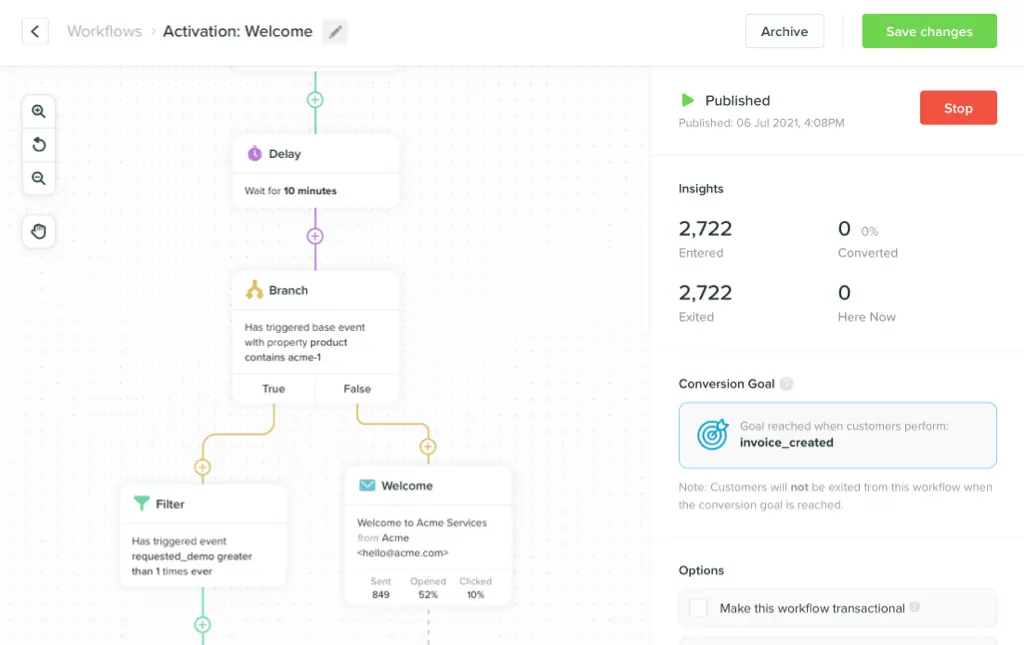
In a visual journey builder, this is handled through conditional branches. A branch fires based on whether a user has push enabled, whether an email was opened, or whether the user has an SMS opt-in on file. Each branch leads to a different next step.
Step 4: Set up exit conditions
Exit conditions are what make a multi-channel journey feel like a real experience rather than an automated inbox assault. Define the conditions that remove a user from the journey the moment they’ve done what you needed them to do.
Common exit conditions:
- User completes the target action (purchases, upgrades, activates a feature)
- User opens any email in the sequence and clicks through
- User replies to an SMS
Exit conditions should be set at the journey level, not per touch. A user who converts on Touch 2 should not receive Touches 3 and 4.
Step 5: Write the messages
Write all channel content before launching the journey. For each touch, you need: the message content, a subject line (email), a push title and body, or an SMS body. Keep each message consistent in tone with the others — even if the format changes, the user should feel like they’re in one conversation, not three separate ones.
A few content rules for multi-channel journeys:
- Don’t repeat the same sentence across channels. Email, push, and SMS can reference the same event, but the framing should be distinct.
- SMS should always feel human. Short sentences. No jargon. A clear, single action.
- Push should have a specific subject — not "You have a notification" but "Your report is ready" or "3 days left on your trial."
Handling channel preferences and opt-outs
A multi-channel journey only works if you respect user preferences at every channel. Sending push to someone who opted out, or SMS to someone who never provided a number, creates friction and damages trust.
Build your journey around three data points per user:
- Email subscription status — are they subscribed? Any hard bounces or unsubscribes must suppress future sends.
- Push opt-in status — have they granted push permission on their device? (iOS requires explicit opt-in; Android doesn’t by default.)
- SMS opt-in status — have they explicitly opted in to SMS? In most jurisdictions, this is legally required before you can send marketing SMS.
Your journey platform should store and respect these attributes automatically. Vero tracks channel opt-in status and routes around opted-out channels without manual configuration. If push isn’t enabled, the push touch is skipped; if SMS isn’t opted in, that branch is bypassed.
Don’t try to work around opt-outs. A user who opted out of push but receives an SMS from you will likely opt out of SMS too. Respect the stated preference and use the fallback channel instead.
Personalization across all three channels
Multi-channel personalization sounds complex. In practice, it comes down to one principle: every message should feel like it was written for this user, not for everyone.
That means using event data to personalize at the segment level, at minimum. If you know the user’s last in-product action, reference it. If you know which feature they used most recently, name it. If you know their account tier or company size, adjust the CTA accordingly.
For email, personalization can go deep — dynamic content blocks, variable-based subject lines, conditional sections based on user attributes. For push and SMS, personalization is necessarily shorter: first name, last action, and a specific CTA.
A practical rule: the shorter the channel, the more specific the personalization should be. A generic email can still convert. A generic push notification won’t get tapped. A generic SMS will get unsubscribed.
Use your journey builder to pass event properties directly into
message templates. In Vero, you reference event properties using
template variables — {{event.last_feature_used}} or
{{user.first_name}} — and the platform fills them
at send time from the data it already has.
Timing rules for multi-channel sequences
The biggest mistake in multi-channel journeys isn’t sending too many messages — it’s sending them too close together.
A user who receives an email, a push notification, and an SMS within the same hour will feel bombarded. Even if each message is individually well-written, the volume creates a negative impression.
Spacing rules that work:
- Allow at least 24–48 hours between touches on the same event.
- Don’t fire push and email simultaneously. Stagger them by at least a day.
- SMS should almost always be the last touch in a sequence — use it as a final escalation, not a first reach.
- Respect quiet hours. Don’t send push or SMS between 9pm and 8am in the user’s local timezone.
Use send-time optimization when your platform supports it. This automatically schedules each touch for when a specific user is most likely to engage — based on their historical open and click patterns. It’s particularly valuable in multi-channel journeys where you’re firing on multiple channels with no-reply windows in between.
Measuring a multi-channel journey
Don’t measure channel performance in isolation. Email open rates, push tap rates, and SMS click rates each tell a partial story. The metric that matters is the journey-level conversion rate: what percentage of users who entered the journey completed the target action?
Track:
Journey-level conversion rate. Users who completed the target action ÷ users who entered the journey. This is your primary success metric.
Channel attribution. Which touch drove the conversion? Most journey builders let you see the last-touch channel that preceded a conversion event. Use this to understand which channel is doing the heavy lifting — and which touches you can cut.
Drop-off by touch. Where are users exiting the journey without converting? High drop-off at Touch 2 means your first email or push nudge is weak. High drop-off before the SMS touch means you might not have enough SMS opt-ins in your audience.
Unsubscribe rate by channel. Rising unsubscribes are a signal that something in the journey feels excessive or irrelevant. If SMS unsubscribes are spiking, the SMS content or timing is off.
Review these metrics monthly for established journeys. New journeys should be reviewed weekly for the first 30 days.
Frequently asked questions
Do I need all three channels to get started? No. Start with two. Email plus push is a strong foundation for most SaaS and B2C products. Add SMS once you have opt-in data and a clear use case for high-urgency moments — don’t add it just because it’s available.
How do I get SMS opt-ins? The most effective moments: during sign-up (with a clear value exchange), at checkout, or at a moment of high user intent — like when they upgrade or reach an important milestone. Be explicit about what they’re signing up for. "Get a text when your trial is about to expire" converts better than "Sign up for SMS updates."
What’s the right length for a multi-channel journey? Depends on the use case. An onboarding journey might run 14–21 days across 8–12 touches. A trial conversion journey might be 7 days across 4–5 touches. A transactional journey (order confirmation, appointment reminder) might be 3 touches over 48 hours. Match the length to the user’s decision timeline.
Can I run the same journey for mobile and web users? Yes, but you may need different channel configurations. Mobile users are accessible via push in ways web users aren’t (unless you’ve implemented web push). Build your journey with mobile and web branches if your product serves both, and route users to the appropriate channel set based on their device type.
What tools do I need to build a multi-channel journey? A single platform that handles all three channels in one workflow is far more efficient than stitching together separate tools. Separate tools mean separate data, separate opt-out management, and no shared logic between channels. Look for a platform that natively supports email, push, and SMS within the same visual journey builder and that stores channel opt-in status per user.
How do I prevent users from feeling spammed? Three rules: send fewer messages than you think you need, always exit users when they convert, and use channel preferences so users control how you reach them. A user who can set "only reach me via email" is less likely to unsubscribe than one who receives push notifications they can’t control.
Conclusion: One journey, not three programs
The shift from running email, push, and SMS as separate programs to combining them in a single journey is one of the highest-leverage changes a product or marketing team can make. The coordination overhead drops. The user experience improves. And the conversion data finally tells a coherent story.
Start simple: two channels, one trigger, clear fallback logic. Add SMS when you have opt-in data and a genuine use case. Measure at the journey level, not the channel level.
If you want to build multi-channel journeys that coordinate email, push, and SMS in a single automated workflow, explore Vero’s journey builder — no credit card required.